
This document will describe how to track Clickstream data from Activator content to Salesforce.
In the Fusion shared resource, find the configuration file called analytics.json as shown in screenshot.
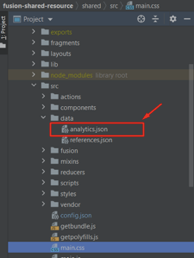
The file should contain configuration as seen here:
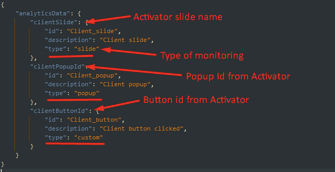
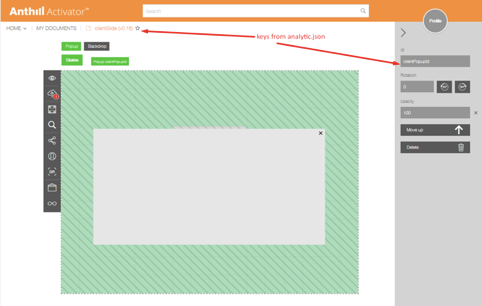
Slide data will be submitted automatically after slide exit in veeva, if defined in this file.
Data for popups will be submitted after the popup is closed.
Custom data (e.g. clicking a button, slider value etc) can also be tracked. This data should have “type”: “custom” in 'analytics.json'.
After updating analytics.json, the shared resource need to be uploaded to Vault as a new version. Publish the presentation and monitoring should work.
A popup clickstream object will have this structure:

Tracked object fields corresponds to object fields defined in analytics.json.
Example:
"id"-> Track_Element_Id_vod__c
"description"-> Track_Element_Description_vod__c
"type"-> Track_Element_Type_vod__c
"answer"-> Answer_vod__c
To track custom data, a method has to be defined somewhere in the code, e.g. to a click handler: trackCustomData(data)
Here is an example of adding code to the source code of slide:
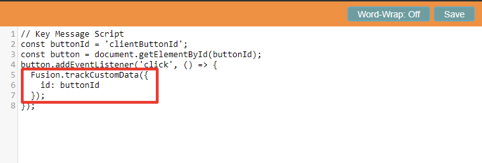
The custom Clickstream object will have this structure:

Note: the 'id' field for 'Fusion.trackCustomData' fuction is required and should correspond to the key in 'analytics.json'.
If you want to track 'answer' - you need to add info to the 'answer' field:
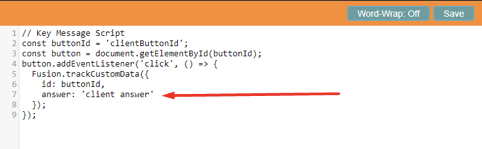
Clickstream object with answer will have this structure:

Example with adding code to a custom component:
Need to import FusionApi to the component:

Then add function for monitoring:
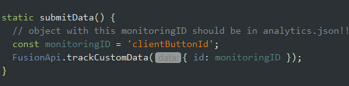
Finally call this function where you want, for example:
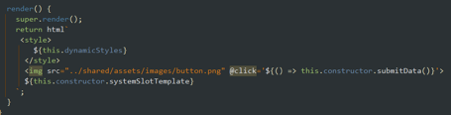
After submitting the data to Salesforce, there should be new clickstreams if everything worked as it should.
In salesforce we have a Call Clickstreams block for each slide, where all custom monitoring that was submitted from slide will be displayed:

Also, reports can be used to preview all clickstream data.